


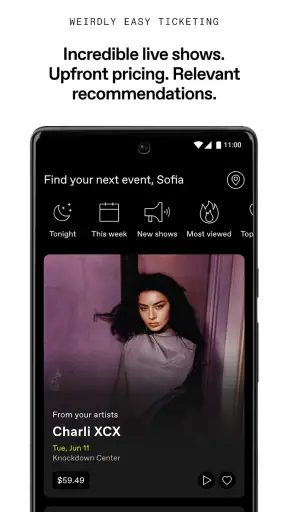
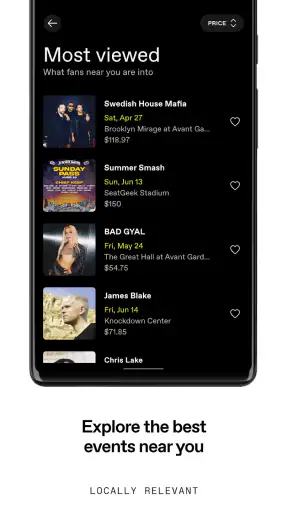
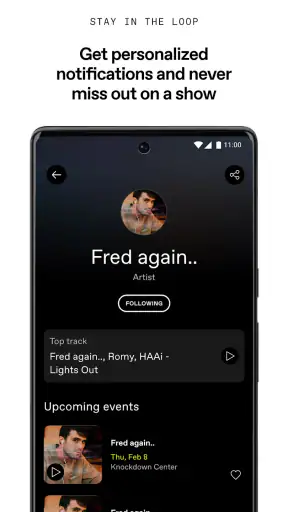
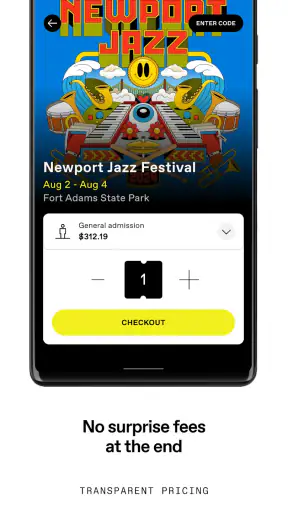
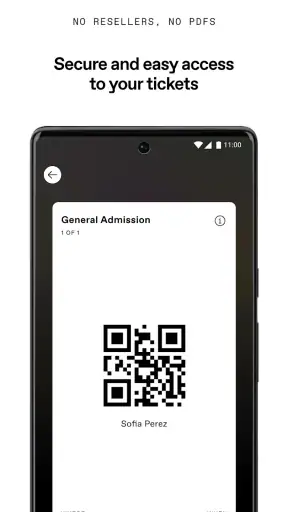
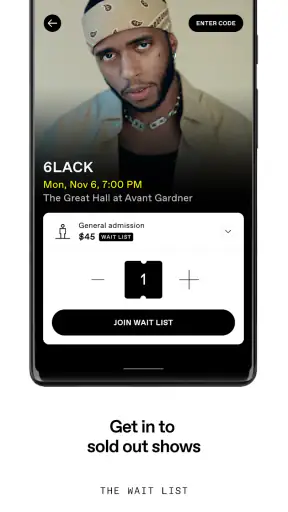
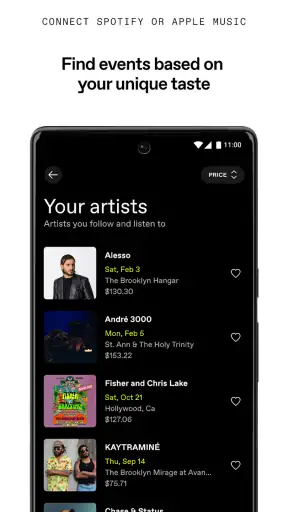
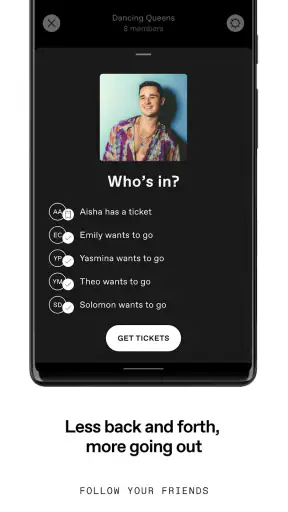
When I want to turn a vague plan to hear live music into an actual night out, DICE: Live Shows is the app I reach for first. It is a free music and audio app from DICE FM, but calling it simply a concert calendar would undersell its practical value. I use it as a discovery tool, a decision-making workspace, and a way to keep the final details of a show together once I have chosen something.
The creative starting point is not creating music inside the app. Instead, it begins with the feeling, artist, venue, or date I have in mind. I might be looking for a small club set, a festival, or something completely new, and the app gives that search a more useful shape than scrolling through general social feeds. Its store summary is “Shows, Clubs & Festivals,” and that focus comes through clearly: the experience is built around going out to hear music rather than passively consuming another streaming library.
I also like that the app feels aimed at a real-world decision. A music service helps me choose what to play now; this one helps me decide where I want to be later. That distinction matters when I am trying to coordinate an evening with friends, find an unfamiliar act, or avoid missing a show that fits my taste. It does not replace every other music app, and it is not meant to, but it gives live events their own useful home.
From a vague idea to a workable night out
The first useful step is browsing with an open mind. Rather than beginning with a perfectly formed plan, I can explore the kinds of live events available and narrow my attention as I go. That makes DICE FM particularly helpful when I know the mood I want but not the performer: something energetic after work, an intimate club atmosphere, a festival day, or a night built around one familiar name.
In my experience, this is where the app is more effective than relying on a general search engine. Search results often mix old announcements, resale pages, venue calendars, and unrelated artist information. A focused live-show app reduces that noise. I can stay in the context of events and compare possibilities without repeatedly opening unrelated pages.
It is also useful for people who already follow artists but want a better way to act on that interest. I may recognize a name in a listing, inspect the event, and decide whether it works with my schedule and the kind of evening I want. The process is less about collecting music and more about moving from curiosity to a concrete plan.
One small habit improves the experience: I try not to judge an event from its title alone. I look at the venue, the date, the overall format, and whether it is a club night or a larger festival setting. That extra pause prevents the common mistake of choosing an event because the headline performer sounds right while the actual timing or atmosphere does not.
The app is especially well suited to people who discover live music through scenes rather than strict genre labels. A festival or club listing can reveal an artist I would not have searched for directly. That is a meaningful strength because live music is often about context: the room, the supporting acts, and the shared audience can matter as much as the name at the top of the page.
What the discovery workflow gets right
I found the strongest part of the workflow to be its ability to support a gradual decision. I can start with a broad browse, move toward a particular show, and then use the event page as the point where planning becomes more serious. That is a better fit for spontaneous evenings than a system that expects me to know the exact artist before I begin.
There is a trade-off, though. If I want a complete, universal database of every venue, every local event, and every type of performance, I would not rely on this app alone. Its identity is tied to the events available through its own service, so coverage and usefulness will naturally depend on where I live and what I want to attend. In a city with strong activity on the platform, it can be a daily discovery tool. Elsewhere, a venue’s own calendar or a broader local events service may still be necessary.
That limitation is important for travelers. I would use DICE to investigate a destination before a trip, but I would also check the venues and artists I already know I care about. The app can help me find possibilities; it should not be treated as the only source for a tightly scheduled itinerary.
For a realistic example, imagine I finish work on a Thursday with no plans. I open the app, browse nearby shows, and find two options: a familiar artist at a larger venue and a lesser-known act in a club. Instead of making a choice from a social post and then searching for details elsewhere, I can compare the event context directly. If I choose the club show, I have moved from an empty evening to a specific plan in a few minutes, while still leaving room for discovery.
Turning discovery into a decision
Once I find a promising listing, I treat the event screen as a handoff point between inspiration and logistics. This is where I want clarity, not more browsing. The practical questions are simple: Is this the right date? Is the venue suitable? Does the event match the mood I had in mind? Can I share the plan with someone else without explaining it from scratch?
I appreciate this separation between finding and committing. It is easy to become distracted by endless recommendations, especially when an app is designed around discovery. DICE works best when I use the browse stage deliberately, then stop exploring once I have found an event that genuinely fits. That keeps the app from becoming another place where I save possibilities without ever attending anything.
My advice is to decide what matters before opening it. If the priority is a nearby club, begin there. If the priority is a particular weekend, use that as the filter in your own thinking. If I enter without any constraint, I can spend too long comparing attractive options that were never realistic for my schedule.
The app also suits group planning better than a loose stream of messages. I can use a specific show as the shared reference instead of sending an artist name, a venue name, and several separate details. That reduces friction, particularly when friends have different levels of familiarity with the act. The event becomes the common object around which the conversation happens.
Making the plan, refining it, and handing it off
Although DICE is not a creative production suite, I found the making process surprisingly relevant to the way people build a night out. I start with a rough concept—“something lively this weekend”—then shape it by comparing events, venues, and formats. The app supports that kind of iteration because the decision does not have to be final at the first screen.
My process usually has three passes. First, I collect a few plausible shows without committing. Second, I remove anything that fails a practical test, such as the date, location, or atmosphere. Third, I return to the strongest option and prepare to share or attend. This is more efficient than opening every result in a separate browser tab because each pass stays centered on live events.
A non-obvious benefit is that the app encourages me to evaluate the event as an experience rather than as a piece of content. With a streaming service, I can sample a track immediately and move on. With a show, I need to think about the room, the timing, the people I am going with, and whether I actually want to spend an evening there. DICE makes that broader judgment feel natural because the event itself remains the central unit.
The iteration stage is also where I notice the app’s limits. I cannot expect it to solve every part of the evening. It can help me choose a show, but I may still need another tool for transport, a calendar for personal scheduling, or a venue’s own information for questions that sit outside the event listing. That is not a failure; it is a reminder to use DICE as the live-event layer rather than as a complete personal organizer.
For creators and independent artists, the app is worth viewing from the audience side first. It can help a potential listener encounter a show in a more intentional context than a passing social post. However, I would not describe it as a full editing, publishing, or campaign-management environment. Someone producing creative work still needs separate tools for making the work, preparing promotional material, and managing the wider release process.
The same distinction applies to venues. DICE can be part of the audience’s path from awareness to attendance, but it is not a replacement for every operational system a venue may use. I would choose it for discovering and organizing the public-facing event experience, not for assuming that it handles the entire backstage workflow.
Sharing without losing the useful details
The handoff matters because live plans often fail in the gap between “this looks good” and “everyone knows what we are doing.” I prefer sharing the event itself rather than rewriting its details in a message. That gives friends a clearer starting point and makes it easier for them to decide whether they are interested.
There is a practical trade-off here: a shared event does not automatically resolve personal logistics. I still need to agree on meeting time, transportation, and who is actually attending. The app can reduce the amount of information I have to copy manually, but it cannot replace a short conversation about the evening.
For a friend who asks whether it is worth installing, my answer depends on their habits. If they regularly attend clubs, festivals, or live shows, the free price makes it easy to try without much commitment. If they only want an audio player, offline listening, playlists, or a large on-demand music catalog, this is the wrong tool. A streaming app will be better for those needs.
The age label is Teen, which is useful context for families deciding whether the app fits a younger listener. Even so, I would still treat the individual event as the important consideration. A general age category does not tell me whether a particular venue, late-night schedule, or performance is appropriate for everyone, so I would make that judgment separately.
Everyday reliability and the finishing stage
On the technical side, the current version is 4.262.0 and requires at least iOS 10 or a later supported operating system. That makes the basic compatibility question straightforward for people using a modern device, while anyone holding on to an older phone should check the system requirement before planning around it.
Its adoption is substantial, with over five million installs and a 4.7 average from around ninety-four thousand ratings. Those figures suggest that the app has become a familiar choice for many live-music listeners, but I still would not treat popularity as a guarantee that it will fit every city or music taste. The local usefulness of an event platform matters more than its global visibility.
When I am close to attending, I think of this as the export stage of the workflow: the discovery has to leave the app and become a real evening. I want the selected event to be easy to revisit, easy to communicate, and clear enough that I am not reconstructing the plan from memory. This is where a focused event app earns its place, even if I use maps, messaging, and a calendar alongside it.
My best practical tip is to review the plan earlier than feels necessary. If I wait until I am already leaving home, any uncertainty about the venue or timing becomes stressful. If I check the event while I still have time to adjust, I can change the plan calmly or choose another show. That simple habit makes the app feel more dependable because I am using it as part of planning rather than as an emergency reference.
I would skip DICE if my main goal is to manage a personal music collection or create and publish audio. It is also not my first choice when I need an exhaustive local-events directory with no dependence on a particular ticketing ecosystem. In those situations, a streaming service, venue calendar, or general event platform may offer broader coverage.
But for the specific job of finding live music and turning interest into attendance, I think it is a strong fit. DICE FM has created a focused bridge between the moment I think “I want to hear something live” and the moment I have a real show in mind. It does not make every planning task disappear, and it is not trying to be a recording studio or a universal organizer. That focus is exactly why I find it useful.
After using it as a discovery and planning tool, my verdict is positive. DICE: Live Shows is best for listeners who want to explore clubs, festivals, and concerts without starting from a precise search every time. I would recommend it to a friend who wants more live music in their routine, especially if the app has good coverage in their area. I would pair it with other tools for transport, scheduling, and audio playback, but I would keep it as the place where the night begins.


